September 8, 2026
How to connect Google Analytics 4 to Claude: the complete guide (2026)
Short answer: the fastest way to connect Google Analytics 4 to Claude is a hosted MCP connector like Attaché: you sign in to Google once with read-only access, tick the properties you want to share, and either paste one URL into Claude’s settings or install the official Attaché connector straight from the Claude connector directory. Count 3 minutes, with no Google Cloud project and no code. The alternatives — manual CSV exports or a self-hosted MCP server — work too, but cost you time on every question or a full day of development, respectively.
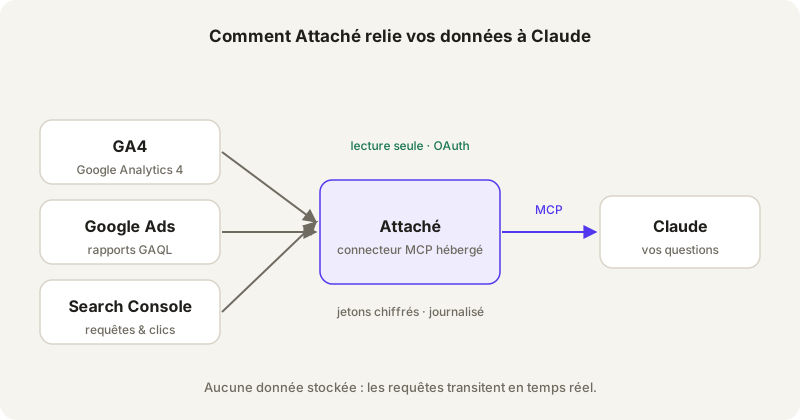
The data path: your Google accounts, Attaché in read-only mode, Claude asking the questions.
We built Attaché because we were asking the same question ten times a day: “how many organic sessions did client X get this month?”. Open GA4, pick the property, navigate to Reports, filter, compare. Two minutes every time. Multiply by an agency’s client list and you understand why we wanted to ask the question in plain English inside Claude and move on.
There are three paths to get there. We have practised all three. Here is what each one really costs.
The CSV export: the method that doesn’t survive a week
Export a GA4 report as CSV, drop it into the conversation, ask your question. It works. Once.
The problem shows up at the second question: if it falls outside the export’s scope, you go back to GA4, export again, start over. The data is stale from the moment it was exported, comparing two properties becomes a puzzle of files, and your conversation history fills with half-read tables. We have seen consultants maintain a 40-file “GA4 exports” folder for a single client. It is the anti-method as soon as you track more than one site — but it stays honest for a one-off question about an account you will never see again.
The self-hosted MCP server: powerful, single-account, time-hungry
An MCP connector is a standardised bridge that lets Claude call an external API — here the Google Analytics Data API — during the conversation, with no copy-pasting. The protocol is open, open-source GA4 servers exist, and if you are a developer the temptation is real. We went down that road.
The honest quote: create a Google Cloud project, enable the Analytics Data and Admin APIs, generate OAuth credentials, host the server somewhere, handle refresh tokens that expire. A day of work for someone comfortable, more otherwise. And at the end, the connector is tied to one Google account. To query a client’s GA4 you start over — or ask for their credentials, which nobody should be doing in 2026.
The hosted connector: 3 minutes, multi-account by design
This is the Attaché path, click by click. You create a workspace at app.attache.studio, click “Connect Google”, authenticate with Google (the consent screen shows the analytics.readonly scope — read-only), and tick the GA4 properties to expose. Attaché gives you a connector URL; in Claude, Settings → Connectors, you paste it. Or skip even that: search for “Attaché” in the official Claude connector directory and install it in one click. Three minutes flat, zero cloud project, zero code.
The structural difference with a home-built server is not setup time — it is the multi-account model. Each of an agency’s clients authorises their own properties through an invitation link — nobody from the agency is ever added to their GA4 — and the agency gets one connector that sees the whole portfolio. Adding a client never requires reconfiguring Claude. The full journey is described on how it works.
What a real question looks like, once connected
Take a fictional agency with an e-commerce client, “Maison Verte”, an online plant shop. Asked in Claude, verbatim:
“On the Maison Verte property, compare sessions and conversion rate by channel over the last 30 days vs the previous 30.”
Claude translates the question into an API query, fetches live data and answers with today’s numbers — including the follow-ups: “now just mobile”, “which landing pages explain the drop?”. No export, no dashboard to build.
What the connector cannot do — on purpose
Attaché is read-only by design. Claude can read sessions, conversions, audiences; it cannot change a property setting or touch anything. No business data is stored: queries pass through in real time, only encrypted OAuth tokens are kept, and revocation is instant — at Google, not just with us. Details on the security page.
Summary
| Method | Setup time | Data freshness | Multi-account |
|---|---|---|---|
| CSV export | 10 min per question | Stale from export time | A puzzle of files |
| Self-hosted MCP server | A day or more | Real time | One server per account |
| Hosted connector (Attaché) | 3 minutes | Real time | Native — from solo to agency |
The trial is 60 days, no credit card, and the first tier is €29/month — sized for one account or fifty. Connect my GA4 to Claude →