September 8, 2026
How to connect Google Ads to Claude: the complete guide (2026)
Short answer: the fastest way to connect Google Ads to Claude is a hosted MCP connector like Attaché: sign in to Google once with read-only access, tick the accounts to share, paste one URL into Claude’s settings — or install the official Attaché connector from the Claude directory. Count 3 minutes. The alternatives — manual report exports or a self-hosted MCP server — exist, but the Google Ads API is the most demanding of Google’s marketing APIs: a developer token that must be approved, a manager account (MCC), quotas. Making it a side project takes weeks, not hours.
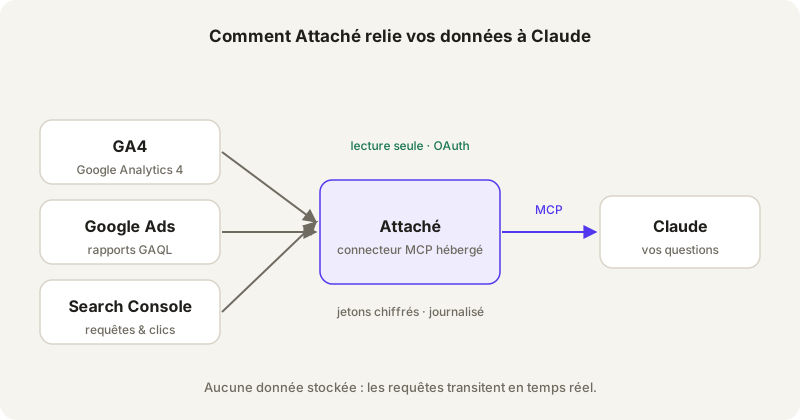
The data path: your Google accounts, Attaché in read-only mode, Claude asking the questions.
The question behind this guide reaches us every week: “I want Claude to analyse my Google Ads campaigns — how?”. It comes from a store owner spending €400 a month as often as from an agency managing €400,000. Good news: the answer is the same for both. Less good news: two of the three possible paths are time traps. We have practised all three — here is the honest quote for each.
The manual export: the spreadsheet that comes back every Monday
Google Ads can export any report to CSV or Sheets. You export, drop the file into Claude, ask your question. For a one-off audit of an account you will never see again, it is defensible.
For actual management, it is not. Campaigns move every day; the export is frozen at the moment you made it. The second question always falls outside the first export — the search terms are missing, or the device split, or the comparison period — and back you go to export again. We timed it: over a week of real monitoring, the CSV method costs more time than the Google Ads interface itself. It is the tool that turns a 30-second question into a 10-minute chore.
The self-hosted MCP server: the hardest of the three DIY paths
An MCP connector is a standardised bridge that lets Claude call an API during the conversation — here the Google Ads API. If you have already stood up an MCP server for GA4, know that Google Ads is a full notch harder:
- The developer token: the Google Ads API requires a developer token requested from a manager account (MCC), with an application form and a “Basic” access level that Google has to approve. Count days, sometimes weeks.
- GAQL: reports are written in a proprietary query language (Google Ads Query Language) with its own traps — a home-built server lets you discover them one by one.
- The usual infrastructure: Google Cloud project, OAuth credentials, hosting, token refresh. Like GA4, only longer.
And at the end, the connector is still tied to a single Google account. For a store owner querying their own account, it is a disproportionate dev project. For an agency, it is one project per client — unmanageable.
The hosted connector: 3 minutes, from a solo account to an agency portfolio
This is the Attaché path. Create a workspace at app.attache.studio, click “Connect Google”, authenticate (the adwords scope is read-only — Attaché cannot change anything in your campaigns), tick the accounts to expose. In Claude: Settings → Connectors, paste the URL — or simpler still, search “Attaché” in the Claude connector directory, where the connector is officially listed. The developer token, the quotas, GAQL: our problem, not yours anymore.
The model works for both profiles. Solo, you connect your own account and ask away. In an agency, every client authorises their own accounts through an invitation link — nobody from the agency is added to their Google Ads — and the master connector sees the whole portfolio. The journey is on how it works.
What the real questions look like, once connected
The ones people actually ask in Claude, verbatim:
- “Which search terms cost me more than €50 without converting this month?”
- “Compare the CPA of my Search campaigns over the last 30 days vs the previous 30.”
- “Which ad groups have a CTR under 2% with more than 1,000 impressions?”
- “Summarise performance by device and suggest bid adjustments.”
Claude translates the question into a query, hits the API in real time and answers with today’s numbers — not the ones from your last export.
What the connector cannot do — on purpose
Attaché is read-only by design. Claude can read your campaigns, costs and search terms; it can neither change a bid, nor pause a campaign, nor touch a budget. No data is stored: queries pass through in real time, only encrypted OAuth tokens are kept, and revocation is instant — at Google, not only with us. Details on the security page. If you are comparing connectors on exactly this point, we wrote an honest comparison: Attaché vs Windsor.ai.
Summary
| Method | Setup time | Data freshness | Multi-account |
|---|---|---|---|
| CSV export | 10 min per question | Stale from export time | A puzzle of files |
| Self-hosted MCP server | Days to weeks (developer token) | Real time | One server per account |
| Hosted connector (Attaché) | 3 minutes | Real time | Native — from solo to agency |
The trial is 60 days, no credit card, and the first tier is €29/month — sized for one account or fifty. Connect my Google Ads to Claude →